How to Safely Rescue Mixed-Charset Files in Bulk: Why I Built This Tool
This article explains an operational workflow built for real environments where CSV from internal systems, Excel exports, and Linux/Windows/DB outputs mix encodings, line endings, and BOM behavior.
Introduction
I built this tool for one simple reason. Handling this manually every single time was exhausting.
CSV files from internal systems, CSV converted from Excel, and configuration files exported from Linux, Windows, or databases all arrive with different origins. Whenever the origin changes, the character encoding, line endings, and BOM usage drift too.
- I expect UTF-8, but it is Shift_JIS
- I expect LF, but it is CRLF
- Some systems require BOM, while others break when BOM exists
Doing detection and conversion by human eyes and intuition does not scale. So I built a tool that accepts files from any origin and normalizes output to the exact import requirements.
Use this:
The real pain is not one broken file
If only one file is corrupted, we can usually recover it. The hard case is when 10 or 100 files arrive together from mixed origins.
Even worse, each destination system has a different definition of “correct.”
- System A accepts only UTF-8 without BOM
- System B is stable with UTF-8 with BOM
- System C assumes Shift_JIS and fails import even if UTF-8 looks readable
In that situation, the generic advice “just use UTF-8” is useless. What we need is a safe, repeatable operation tuned to the destination.
What I wanted this tool to do
The design has only three principles.
- Accept files from any origin
- Convert based on destination import requirements
- Avoid increasing incidents even in batch processing
This is not a showcase of conversion tricks. It is an operational tool that reduces friction.
The procedure I actually use
1. Decide the output specification first
Do not start from input assumptions; lock output requirements first. Fix these three items:
- Encoding (UTF-8 / Shift_JIS, etc.)
- Line endings (LF / CRLF)
- BOM (with / without)
If this stays ambiguous, results will change whenever the operator changes.
2. Split conversion targets into small groups
Do not process everything at once. Split by system, time period, or file type, and start with small batches.
Why: rollback is possible when something fails. A full-volume one-shot run is fast only when it succeeds.
3. Add the files and set the output options
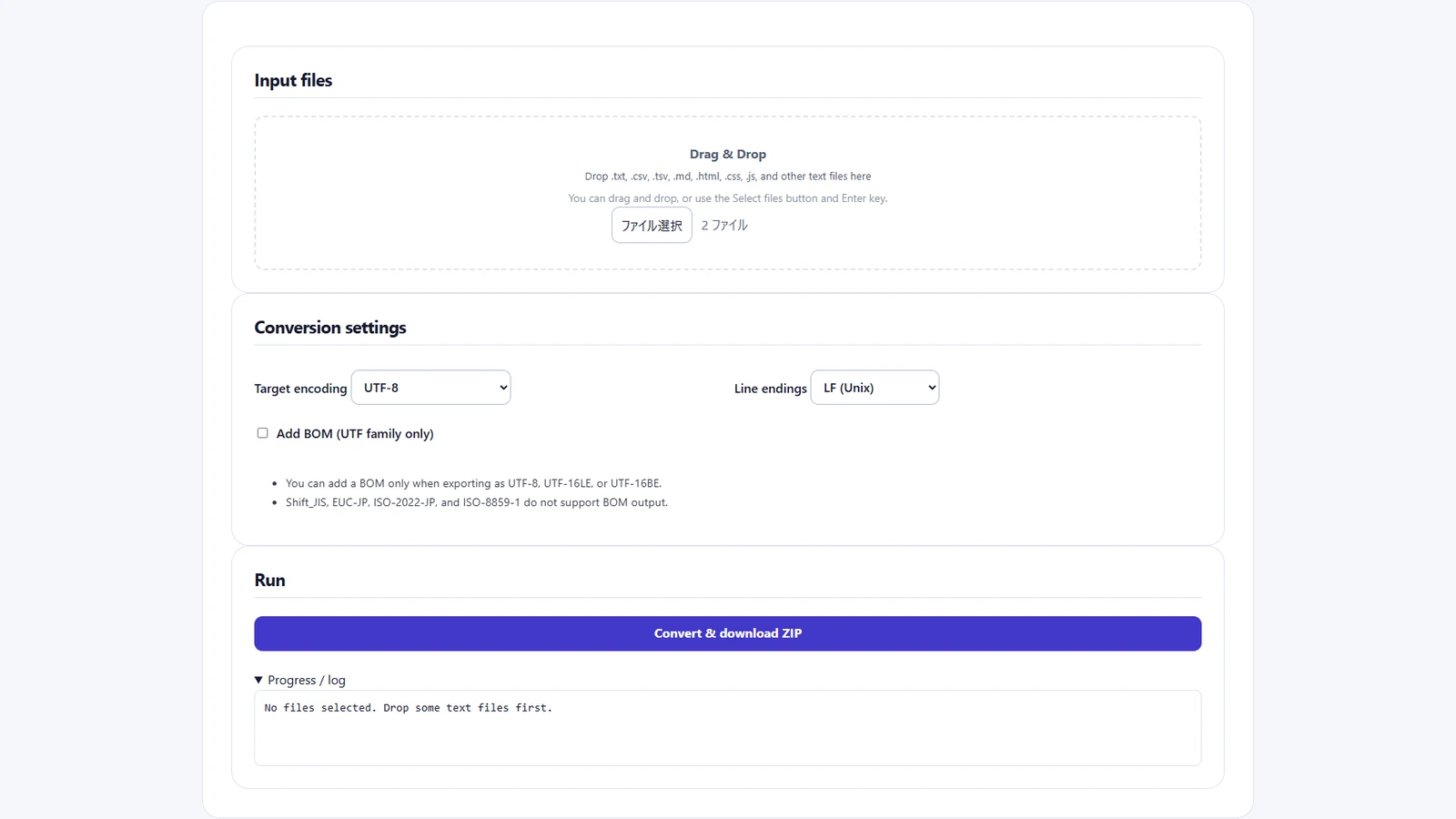
In this example, convert orders-utf8.csv (UTF-8, LF, with BOM) and orders-utf16.csv (UTF-16LE, CRLF, with BOM) to UTF-8 with LF and no BOM. These are fictional orders. Both files have an id,item header, followed by 001,東京 and 002,大阪, respectively.
- Drop both files in the input area of the Character Encoding Converter. Check that Progress / log reports two files in total.
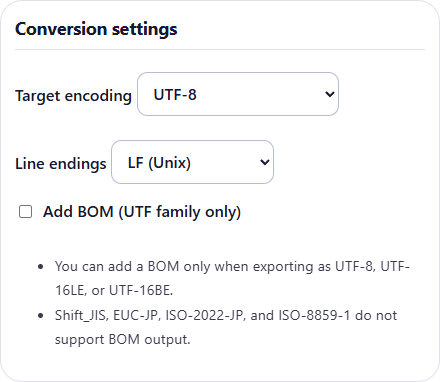
- Set the output encoding to UTF-8 and line endings to LF (Unix). Clear Add BOM (UTF family only). These settings apply to every file in the batch. Reload the page before adding a separate batch for files with different import requirements.
4. Save the ZIP and check the log against its contents
- Click Convert & download ZIP. In Progress / log, check the detected input encoding and line endings, then the output encoding, line endings, and BOM status. In this example the detected inputs differ and both outputs show
UTF8 / LF / BOM=none. - Extract the downloaded
converted-*.zipinto a separate folder and check that it contains both CSVs under their original names. If a file was skipped or an error occurred, identify the affected file and the cause before retrying.
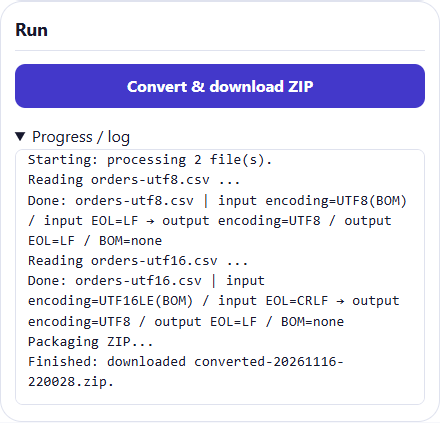
The converter checks for a BOM first when detecting the input encoding. If detection is uncertain, check the source system’s export specification even when the output looks readable.
5. Never rely on visual checks only
“File opens fine” is the entrance to incidents. At minimum, verify:
- Row count matches before and after
- CSV/TSV column counts are preserved
�(replacement character) does not increase- Key columns (ID/code) keep their length and character type
If any check fails, do not proceed to import.
BOM is not ideology; decide by counterpart requirements
Arguments about BOM vs no BOM are mostly pointless in operations. Only one thing matters: how the counterpart system consumes files.
- If the counterpart is stable with BOM, output with BOM
- If the counterpart breaks with BOM, output without BOM
Prioritize “a format that does not break the other side” over “the theoretically correct format.” That is practical operations.
The value is not conversion itself
The true value is twofold:
- Decisions do not vary by person
- Repeated verification cost goes down
Encoding incidents cannot be reduced to absolute zero. But we can stop repeating the same incident patterns. That is why I prepared a tool that accepts anything and returns files normalized for the target use.
Conclusion
This tool was not built from ideal theory. It was built to eliminate recurring, tedious encoding adjustments in real operations.
Accept files from different origins, align encoding/line endings/BOM to destination requirements, and return normalized outputs. Automating this flow alone makes operations much easier.
Mojibake handling is not a job to survive with willpower. Turn it into a reproducible procedure so anyone gets the same result. Only then can we say we can safely rescue mixed files in bulk.